
Half-day tutorial at SIGOPS ATC 2026, Hong Kong
FEMU for Next-Generation Storage Research
Emulating, Extending, and Building the Future of Storage Systems
FEMU is an open-source SSD emulator built on QEMU/KVM. A guest operating system uses the emulated device through standard NVMe and CXL interfaces, while the device itself, including its flash translation layer, garbage collection and timing model, is code you can read, measure and change. This tutorial shows how to use it for storage research and how to extend it.
Materials and links
Code
- FEMU on GitHubSource, issues and discussions
- Contributing guideHow to propose and test a change
Set up
- Get startedBuild FEMU and boot a guest
- Host requirementsLinux, KVM and memory
- Guest imageThe VM image the exercises use
Learn
- FEMU ManualArchitecture, modes and configuration
- Manual tutorialsExercises that match the sessions
- FEMU websiteNews, research and community
Tutorial
- Slides and lab guideNot yet released; this page will link them
- Mailing listQuestions before and after the tutorial
About the tutorial
The morning follows one I/O request from a guest application into the emulated device. It then uses the same setup to look at device-managed flash, Flexible Data Placement, Zoned Namespaces, computational storage and CXL-attached SSDs. The last session shows how to add a device feature, test it and share it.
Each session pairs a short explanation with an example on FEMU, and links to the manual pages and exercises you can repeat afterwards.
Who should attend
Graduate students starting storage research, file-system and database researchers who want to see what happens inside the device, and developers prototyping storage interfaces.
No prior FEMU experience is needed. Familiarity with Linux and basic storage concepts helps.
Program
Sunday, November 15, 2026. All times are Hong Kong local time. Times within the morning may shift slightly.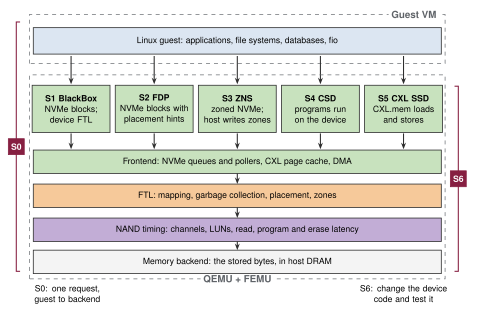
| Time | Session | Related |
|---|---|---|
| 08:00 | Welcome and setup checkGoals of the morning, the FEMU project and how to follow along. | |
| 08:10 | S0FEMU architecture and the I/O pathFrom a guest application through the NVMe driver into FEMU; NoSSD mode as a baseline without media timing. | ArchitectureFirst SSD |
| 08:40 | S1BlackBox SSDs: mapping, garbage collection and write amplificationLogical-to-physical mapping, garbage collection and NAND timing, and how to measure write amplification over a fixed interval. | BlackBox modeGC and WAF |
| 09:10 | S2Flexible Data Placement (FDP)The same workload with and without placement hints, with capacity and measurement held constant. | FDPExerciseWARP paper |
| 09:35 | S3Zoned Namespaces (ZNS)Zone states, sequential writes, append and reset, and what the host must now manage. | ZNS modeExercise |
| 09:55 | Questions | |
| 10:00 | Coffee breakProvided by the conference. | |
| 10:30 | S4Computational storageA compute request run on the device, checked against a host reference result.Presented by Tao Lu, DapuStor | CSD modeCEMU paper |
| 10:50 | S5CXL-attached SSDsFrom CXL device discovery to usable guest memory, with flash behind a memory interface. | CXL SSDExerciseCylon paper |
| 11:10 | S6Extending FEMU, testing and contributingAdd a small device command, test it, and package the change so others can reproduce it. | Code structureContributing |
| 11:40 | Questions and next stepsOpen discussion, and how to stay involved in the FEMU community. | Community |
Before you come
You can follow the whole tutorial without running anything. To run the exercises yourself:
- Use an x86-64 Linux machine with KVM, local or reachable over SSH. Check the host requirements; the FDP exercise needs about 20 GiB of free host memory.
- Build FEMU and boot a guest with Get started, and prepare the guest image.
- Skim the architecture overview and choosing a mode.
The extension session uses C; the rest uses the Linux shell.
FAQ
- Do I need an SSD or a CXL device?
- No. Every session uses emulated devices. Running the exercises yourself needs an x86-64 Linux host with KVM.
- Can I follow along on a Mac or Windows laptop?
- Yes, by connecting over SSH to a Linux machine with KVM. A laptop on its own can follow the talks and read the code, but cannot run the guest exercises.
- Does FEMU predict the performance of a specific real SSD?
- Not without calibration. FEMU makes device mechanisms observable and configurable; matching a particular drive requires measuring that drive and tuning the model to it.
- Will the tutorial be recorded?
- No recording has been announced. This page will link the slides and lab guide when they are released.
Other questions: the FEMU mailing list, GitHub Discussions, or issues for bugs.
Organizers

Creator and maintainer of FEMU. Works on operating systems, storage and memory systems.

Works on memory and storage systems; co-author of Cylon, the FEMU CXL SSD emulator.

Works on storage systems; co-author of WARP, the FEMU FDP emulator.
Co-author of CEMU, the computational storage emulator. Presents the computational storage session (S4).
Huaicheng Li, Hansen Idden and Shoaib Qazi are from MoatLab at Virginia Tech; Tao Lu is from DapuStor.
Papers
| Paper | Venue | Covered in |
|---|---|---|
| The CASE of FEMU: Cheap, Accurate, Scalable and Extensible Flash Emulator | FAST '18 | FEMU itself; all sessions |
| Characterizing and Emulating FDP SSDs with WARP | FAST '26 | S2, Flexible Data Placement |
| CEMU: Enabling Full-System Emulation of Computational Storage Beyond Hardware Limits | ASPLOS '26 | S4, computational storage |
| Cylon: Fast and Accurate Full-System Emulation of CXL-SSDs | FAST '26 | S5, CXL-attached SSDs |
BibTeX for each paper is on Cite FEMU.