Quick start
This page is hw/femu/docs/getting-started/quick-start.md at FEMU 39a55eeb6 (2026-10-02), licensed GPL-2.0-or-later. Send corrections to the FEMU repository.
From a fresh clone to a running BlackBox SSD (BBSSD). On a 20-core host the whole run took 5 minutes, most of it compiling. You build FEMU, build a guest image, boot the guest with an emulated SSD, write to the SSD with fio and read its write amplification factor (WAF).
You need an x86_64 Ubuntu or Debian host with KVM, sudo, network access, and
about 17 GiB of free RAM. requirements.md has the details.
You use two terminals. Terminal 1 runs the virtual machine. Terminal 2 talks to it over SSH.
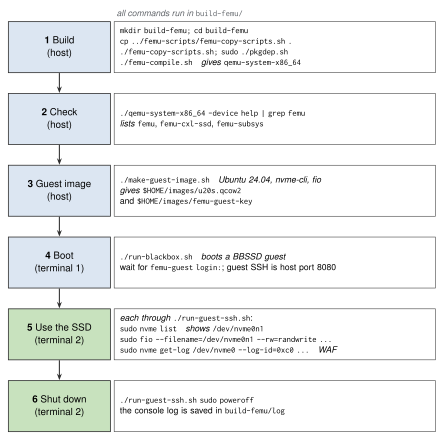
Figure: Quick start: build FEMU, make the guest image, boot a BBSSD guest, then use the SSD over SSH. Host steps are blue, steps inside the guest green.
1. Build FEMU (terminal 2)
git clone https://github.com/MoatLab/FEMU.git
cd FEMU
mkdir build-femu
cd build-femu
cp ../femu-scripts/femu-copy-scripts.sh .
./femu-copy-scripts.sh
sudo ./pkgdep.sh
./femu-compile.sh
femu-compile.sh takes 3 to 15 minutes, depending on the number of cores,
and ends with
===> FEMU compilation done .... Check that the build has the FEMU device:
./qemu-system-x86_64 -device help | grep femu
name "femu", bus PCI, desc "FEMU Non-Volatile Memory Express"
name "femu-cxl-ssd", bus PCI, desc "FEMU CXL SSD"
name "femu-subsys", desc "FEMU NVMe Subsystem (FDP)"
If the build fails, see build.md.
2. Build the guest image (terminal 2)
Still in build-femu/:
sudo apt install curl cloud-image-utils
./make-guest-image.sh
This downloads the Ubuntu 24.04 cloud image (about 600 MB) and provisions it, which takes one to a few minutes. It ends with:
Image ready: /home/<you>/images/u20s.qcow2
If it fails, read ~/images/provision.log. guest-image.md
explains the options and alternatives.
3. Boot the guest with a BBSSD (terminal 1)
Open a second terminal, go to the same build-femu/ directory, and run:
./run-blackbox.sh
The script prints the -device femu,... line it uses, asks for your sudo
password, and boots the guest on this terminal. Wait for the login prompt,
about 30 seconds:
femu-guest login:
You cannot log in here (user femu has no password). Leave the terminal
running.
The guest's SSH port is forwarded to host port 8080. If another program
already uses 8080, QEMU stops with Could not set up host forwarding rule.
Pick a free port and set it for both scripts, in both terminals:
export SSH_PORT=8081
4. Look at the SSD (terminal 2)
Back in terminal 2, in build-femu/:
./run-guest-ssh.sh sudo nvme list
Node                  Generic               SN                   Model                                    Namespace  Usage                      Format           FW Rev
--------------------- --------------------- -------------------- ---------------------------------------- ---------- -------------------------- ---------------- --------
/dev/nvme0n1          /dev/ng0n1            vSSD0                FEMU BlackBox-SSD Controller             0x1         12.88  GB /  12.88  GB    512   B +  0 B   1.0
/dev/nvme0n1 is the emulated SSD. The guest's own disk is /dev/sda.
If SSH says Connection refused, the guest is still booting; wait and retry.
5. Write to it with fio (terminal 2)
./run-guest-ssh.sh sudo fio --name=qs --filename=/dev/nvme0n1 --direct=1 --ioengine=libaio --rw=randwrite --bs=4k --iodepth=16 --size=1G
fio writes 1 GiB of random 4 KiB blocks and prints the bandwidth and latency it saw. The latency includes the emulated NAND program time.
6. Read the write amplification factor (terminal 2)
FEMU reports its media counters in the vendor log page C0h. The first 4 bytes are the WAF times 1000:
./run-guest-ssh.sh "sudo nvme get-log /dev/nvme0 --log-id=0xc0 --log-len=512 -b | od -An -t u4 -N 4"
1000
1000 means a WAF of 1.000: every page the host wrote was programmed once, and garbage collection has not run yet. The next three 8-byte counters are the pages the host wrote, the pages garbage collection moved, and the pages programmed in total:
./run-guest-ssh.sh "sudo nvme get-log /dev/nvme0 --log-id=0xc0 --log-len=512 -b | od -An -t u8 -j 8 -N 24 -w24"
262144 0 262144
Write more than the drive's capacity, and the second counter and the WAF grow. log-pages-and-counters.md lists every counter.
7. Shut down (terminal 2)
./run-guest-ssh.sh sudo poweroff
The guest powers off and run-blackbox.sh returns in terminal 1. The data on
the emulated SSD is gone: FEMU keeps it only in host memory.
If the guest hangs, stop QEMU from terminal 1 with Ctrl-a then x.
run-blackbox.sh saves the console output of the run in build-femu/log and
overwrites it on the next run.
Next steps
- Change the geometry and latency at the top of
run-blackbox.sh, or pick another mode with anotherrun-*.shscript. The doc map lists the guides. - Every property: reference/properties.md.