Zoned namespaces
This page traces the ZNS implementation through the source. For launch lines, guest commands, limits and verification, use the ZNS guide in the FEMU Manual.
femu_mode=3 exposes sequential-write zones. The host manages placement and
zone lifetimes; FEMU validates zone state, advances write pointers, and models
reads, programs, and resets. Start with zns.conf.
Command and media paths
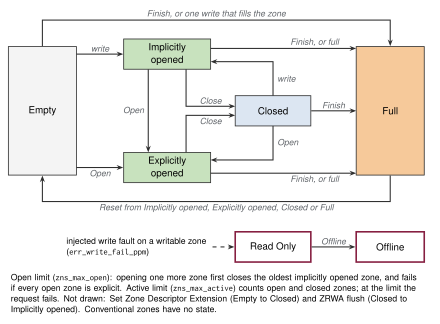
The state diagram groups implicit and explicit open into one state. The command handler also distinguishes conventional, read-only, and offline cases. A normal sequential zone only accepts writes at its write pointer; Zone Append chooses the current pointer and returns the chosen position.
Read the state machine against the implementation
| Operation | Function | State and resource consequence |
|---|---|---|
| Explicit Open | zns_open_zone() | An Empty zone first passes the active-limit check; at the open limit an implicitly open zone is then closed to make room; Empty acquires active then open capacity, and failure to acquire open capacity rolls back the newly acquired active slot |
| Close | zns_close_zone() | Implicitly or explicitly open becomes Closed; an already Closed zone succeeds without acquiring resources |
| Finish | zns_finish_zone() | Empty, Open, or Closed becomes Full; Open and Closed release the resources they hold |
| Reset | zns_reset_zone() | Empty is already reset; Open, Closed, and Full enter reset processing; other states reject this transition |
| Write-driven opening | zns_auto_open_zone() | An Empty target first passes the active-limit check; the path may then close an implicitly open zone before checking the open limit |
This order matters when debugging limits. An explicit Open failure from Empty does not consume an active slot. Both paths check an Empty target's active limit before closing anything, so a command refused for the active limit leaves other zones as they were. A command that succeeds at the open limit may still have closed another, implicitly open zone. Report all affected zones, not only the target zone, when investigating that sequence.
Geometry differs from black-box geometry
ZNS uses zns_num_ch, zns_num_lun, zns_num_plane, and zns_num_blk, with
an internal 16 KiB NAND page. At this revision:
pages_per_block = namespace_bytes / 16384
                  / (zns_num_ch × zns_num_lun × zns_num_blk)
zone_bytes = channels_per_zone × zns_num_lun × zns_num_plane
             × pages_per_block × 16384
Integer divisions truncate. zns_chnls_per_zone=0 uses all channels; a positive
value must divide the channel count. The 4 GiB recipe produces 256 MiB zones
and 16 zones. These formulas follow the current implementation, including its
plane factor; do not substitute the black-box capacity calculator.
Resource and timing controls
| Property | Unit and meaning |
|---|---|
zns_max_active, zns_max_open | Zone counts; zero means unlimited |
zns_zone_cap | Writable bytes per zone; zero uses full zone size |
zns_num_conv_zones | Leading zones treated as conventional/random-write |
zns_zd_ext_size | Descriptor-extension bytes, validated by the handler |
zns_chnls_per_zone | Channel width of one zone |
zns_cross_zone_read | Whether reads may span zone boundaries |
zns_zasl_bs | Maximum append transfer bytes; zero falls back to MDTS |
zns_flash_type | Numeric cell type; default QLC |
zns_pg_rd_lat, zns_pg_wr_lat, zns_blk_er_lat | Array-time overrides in ns |
zns_cmd_addr_lat, zns_pg_xfer_lat, zns_status_lat | Optional channel phases in ns |
zns_pe_suspend, zns_tsusp_ns | Read preemption of program/erase and overhead |
The shared media adapter gates on a plane. It keeps channel accounting off until a bus phase is set. SLC, TLC, and QLC have built-in values; MLC and PLC require explicit read, program, and erase times. Zone reset charges erase time rather than treating state reset as a free operation.
Distinguish open and active limits
An open zone holds both an open and an active resource. Closing it releases
only the open resource. Finishing or resetting it releases its active resource
as well. A closed zone therefore still counts toward zns_max_active.
For a focused experiment, copy zns.conf and change the
[zones] section to zns_max_open = 1 and zns_max_active = 2. Keep the
remaining geometry unchanged. Start a fresh emulator and select three empty
sequential zones, A, B, and C, from Report Zones. Use their reported start LBAs,
not byte offsets, for individual zone-management commands. Keep other traffic
off this expendable namespace and leave ZRWA disabled.
Issue explicit Open, Close, and Finish commands in this order. Report zones after every command and save its completion status:
| Command | Expected result | Open / active resources after command |
|---|---|---|
| Open A | A becomes explicitly open | 1 / 1 |
| Open B | Too many open zones; B stays empty | 1 / 1 |
| Close A | A becomes closed | 0 / 1 |
| Open B | B becomes explicitly open | 1 / 2 |
| Close B | B becomes closed | 0 / 2 |
| Open C | Too many active zones; C stays empty | 0 / 2 |
| Finish A | A becomes full, without filling it with host data | 0 / 1 |
| Open C | C becomes explicitly open | 1 / 2 |
Counts in the table follow the implementation's resource accounting. Use zone states to check them; these are not additional fields promised in Report Zones. Finish advances the write pointer to the writable boundary. Reset returns the zone to empty and is required before reusing a finished zone. Closing alone does not rewind its write pointer or reclaim its active resource.
Do not replace the explicit Open commands with writes in this test. A write
opens a zone implicitly, and at the open limit both zns_auto_open_zone() and
zns_open_zone() close an implicitly open zone to make room, so with writes
the second Open B would succeed. Explicitly opened zones are never closed this
way. Resource failures carry the do-not-retry bit. These expected results were
traced in the source; for a guest-tested walk through zone states, append and
the open limit, follow tutorial 03.
Zone Random Write Area
Enable ZRWA by setting all three properties together:
zns_zrwa_size, zns_zrwafg_size, and zns_zrwa_num. The first two are counts
of logical blocks; the last is the number of available ZRWA resources. Size
and zone capacity must both be divisible by flush granularity, and the Identify
field limits apply.
The host allocates a ZRWA to a zone through zone-management commands. Writes can then be out of order within the permitted moving window, with explicit or implicit flush advancing it. Allocation is finite and released by the relevant zone transitions. This feature does not remove ordinary sequential-zone rules from zones that have no allocated ZRWA.
Injected write faults
Set err_write_fail_ppm=1000 on the ZNS device to inject a fault on every
1000th write reaching the injection point. The counter is per zoned namespace,
not per zone. The period uses integer division, as described under
error injection. The black-box read-error
property does not enable a corresponding ZNS read injection path.
Injection occurs after payload transfer and zoned-write finalization. The
affected zone becomes read-only, releases its open and active resources,
and enters the Changed Zone List. The failing request returns
NVME_WRITE_FAULT with the do-not-retry bit; later writes are rejected by the
zone state machine. Failure status therefore does not imply an unchanged
payload or write pointer.
For a short validation run, use err_write_fail_ppm=500000 to select every
second eligible write. Start a fresh namespace, submit two valid sequential
writes, and inspect completion status, the zone report, and Changed Zone List.
Check that a subsequent write to the affected zone is rejected. Keep unrelated
traffic off the namespace because it advances the same counter. This is a
source-derived procedure; the ZNS guide describes the
Changed Zone List and its notice.
Verification
sudo nvme id-ns /dev/nvme0n1
sudo nvme zns id-ns /dev/nvme0n1
sudo nvme zns report-zones /dev/nvme0n1
Confirm zone size, capacity, count, limits, and write pointers. On an expendable namespace, exercise sequential writes, append, close, finish, and reset; report zones after each transition. Compare mismatched writes and resource exhaustion with the expected error status before running a filesystem or placement study.
Implementation sources
Reviewed against FEMU 39a55eeb637b. The examples describe this revision; see validation coverage.
- zns/zns.c: geometry, zone states, ZRWA, and command validation
- zns/zftl.c: per-zone placement, media timing and reset
- femu.c: ZNS property defaults